Choosing smart bulbs badly is expensive in a quiet, annoying way: the bulb fits but is too dim, the colour looks cold, or it refuses to work with the app you already use. If you want to know how to choose smart bulbs without filling a drawer with mistakes, start with four checks: fitting, brightness, white tone and compatibility.
In This Article
- The Quick Answer: How to Choose Smart Bulbs
- Lumens, Fittings and Lamp Shapes: Get the Physical Basics Right
- Colour Temperature and Colour Quality: The Bit People Regret Later
- Compatibility: App, Hub, Matter and Voice Assistant Checks
- Room-by-Room Choices That Actually Make Sense
- Smart Bulb Picks and UK Price Ranges
- Mistakes to Avoid Before You Order
- Frequently Asked Questions
The Quick Answer: How to Choose Smart Bulbs
For most UK homes, the best first smart bulb is an 800-1,100 lumen tunable white E27 or B22 bulb from a brand that already fits your smart home. That usually means Philips Hue if you want the most reliable whole-home system, TP-Link Tapo if you want a cheaper Wi-Fi bulb, IKEA smart bulbs if you are happy with a hub-based setup, or Nanoleaf Essentials if Matter support is the priority.
The dull answer is also the useful one: do not start with colour. Start with light quality. A smart bulb that gives poor everyday white light is still poor lighting, even if it can turn the room purple for ten minutes on Christmas Eve.
My default recommendation
If I were buying for a normal living room lamp today, I would pick:
- Budget: TP-Link Tapo L530E, usually about £8-£12 per bulb from Amazon UK, Currys or Argos.
- Mid-range: IKEA smart bulbs, often about £8-£15 per bulb, plus a Dirigera hub if you want a neater system.
- Premium: Philips Hue White and Colour Ambiance, usually about £45-£55 per E27 bulb unless you catch a starter-kit deal.
- Matter-first: Nanoleaf Essentials Matter bulbs, usually about £18-£25 per bulb depending on fitting and offer.
That is not because colour bulbs are always needed. They are not. Bedrooms, offices and kitchens often work better with tunable white bulbs, where you can move from warm evening light to cleaner working light. Full RGB colour is useful for accent lamps, gaming rooms and decorative lighting, but it is wasted in a hallway ceiling pendant.
This article deliberately stays on the buying decision. If you already own bulbs and need pairing steps, read our separate guide to setting up smart lights in your home. If you are choosing between Zigbee, Z-Wave and Wi-Fi as a system, the deeper protocol guide is here: Zigbee vs Z-Wave vs Wi-Fi.
Lumens, Fittings and Lamp Shapes: Get the Physical Basics Right
The first job is boring but non-negotiable: check the bulb physically fits and gives enough light. Smart features cannot rescue a dim bulb in the wrong cap.
Lumens matter more than watts
Old bulb buying was easy because everyone knew roughly what 40W, 60W and 100W meant. With LED and smart bulbs, watts tell you energy use, not brightness. Lumens tell you light output.
Use this rough UK home guide:
- 400-500 lumens: soft bedside lamp, small table lamp, low evening light.
- 700-900 lumens: typical living-room lamp or bedroom ceiling pendant.
- 1,000-1,600 lumens: brighter kitchen, home office or larger ceiling shade.
- 2,000+ lumens: usually not one bulb; think multi-bulb fittings, panels or dedicated fixtures.
In a real room, lampshades make a bigger difference than people expect. A dark fabric shade can swallow a surprising amount of light, so an 806 lumen bulb that looks fine bare can feel gloomy once it is inside a shade. I tend to choose the brighter option if a lamp has a shade, then dim it in the app.
Check the cap before the app
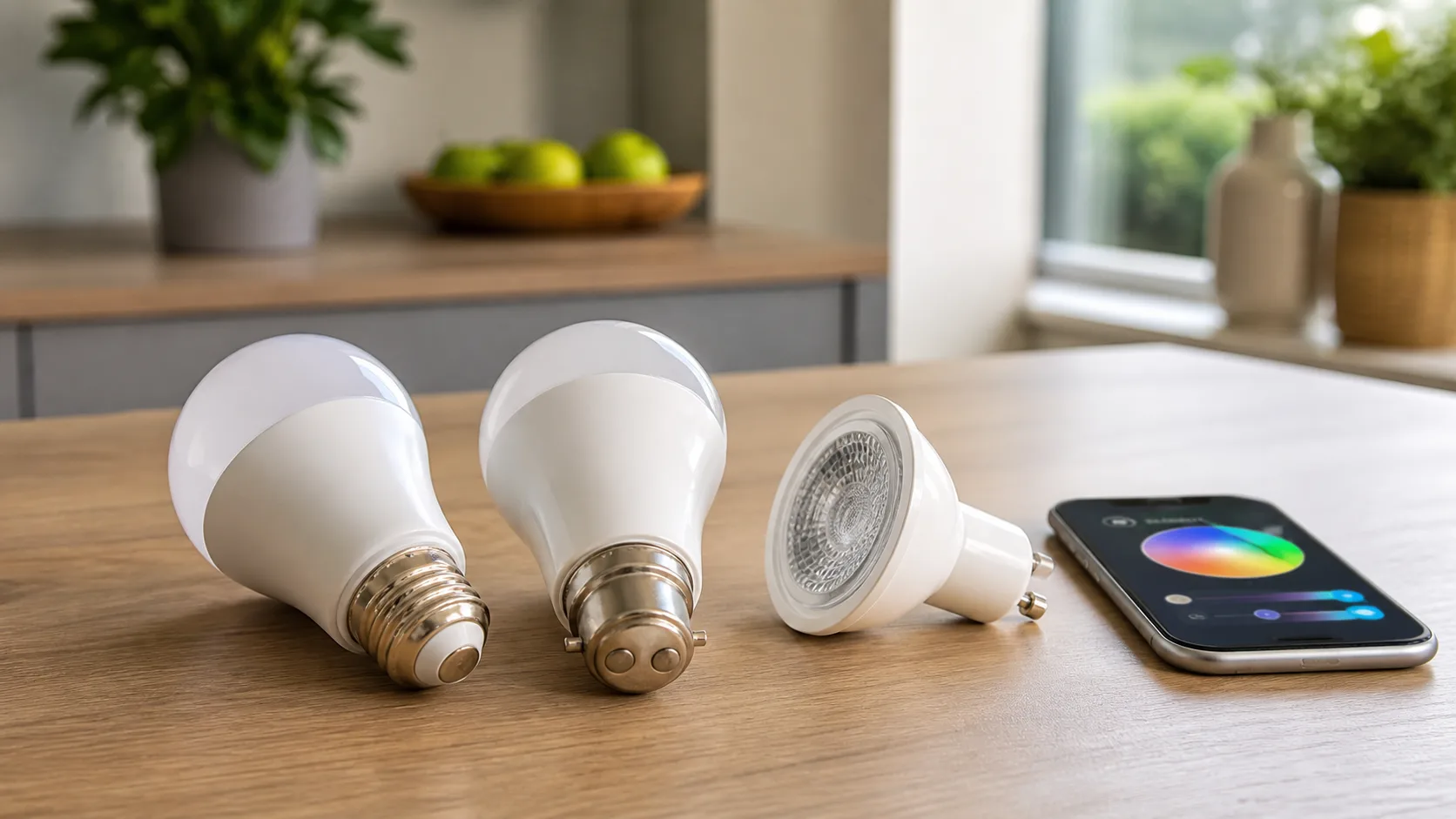
UK homes commonly use:
- B22 bayonet: very common in older UK ceiling pendants and table lamps.
- E27 Edison screw: common in newer lamps, IKEA fittings and many smart bulb ranges.
- GU10: common in kitchen and bathroom spotlights.
- E14 small screw: found in chandeliers, smaller lamps and some decorative fittings.
Do not assume an adaptor is the answer. B22-to-E27 adaptors can make a bulb sit too low in a shade, look ugly, or stop a cover fitting back on. For exposed lamps, buy the correct cap. It looks better and removes one more failure point.
Bulb shape affects the result
Smart bulbs are often fatter than standard LED bulbs because the electronics need space. That matters in narrow shades, enclosed globes and upward-facing wall lights. Before buying a multi-pack, measure one fitting and order a single test bulb if the space is tight.
There is also beam angle. A GU10 spotlight over a kitchen worktop needs a useful spread, not a tiny bright circle. For ceiling downlights, I prefer a wider beam for general lighting and narrower beams only where you want to pick out a picture, shelf or worktop.
Enclosed fittings are a trap
Many smart bulbs dislike heat. Put one inside a sealed glass globe and it may run hot, dim itself, drop offline or fail early. If the fitting is enclosed, check the manufacturer page before buying. If the brand says not to use it in enclosed fixtures, believe it. A cheap mistake here is still £10-£50 wasted.
Colour Temperature and Colour Quality: The Bit People Regret Later
Colour temperature is the difference between a cosy room and a kitchen that feels like a dentist’s surgery. It is measured in Kelvin, usually written as K.
The useful Kelvin ranges
For UK homes, these ranges cover most decisions:
- 2,200K-2,700K: warm, relaxed evening light. Good for bedrooms, living rooms and lamps.
- 3,000K: warm white with a cleaner edge. Good for kitchens, dining spaces and hallways.
- 4,000K: neutral white. Good for utility rooms, garages and some home offices.
- 5,000K-6,500K: cool daylight. Useful for tasks, but harsh as normal evening lighting.
The sweet spot for most smart bulbs is tunable white, often around 2,200K to 6,500K. That lets you use warmer light at night and cleaner light when cooking, cleaning or working. TP-Link’s UK Tapo L530E page, for example, lists a tunable range and colour bulb spec on the official product page, which is the sort of detail worth checking before you buy: TP-Link Tapo L530E UK specifications.
Full colour is fun, not always useful
Colour bulbs are worth paying for in accent lamps, kids’ bedrooms, gaming spaces and rooms where you actually want mood lighting. They are less useful in a main kitchen ceiling fitting. Most people use red, blue or green for a week, then settle back into warm white.
That does not make colour pointless. It just means you should buy colour where it adds something. A Philips Hue colour bulb in a corner lamp can make a living room feel properly finished. A full set of colour GU10s across a kitchen ceiling can be a very expensive way to discover you only use warm white.
Colour rendering is the quiet quality difference
Cheap bulbs can make food, paint colours and skin tones look odd. That is colour rendering. Manufacturers may list CRI, short for Colour Rendering Index. Higher is better, with 80+ being normal and 90+ better for areas where colour matters.
You do not need to obsess over CRI for a hallway. You might care in a kitchen, dressing area, home office or anywhere you choose clothes, cook food or film video calls. In my experience, this is where premium bulbs feel less annoying day to day. They are not just brighter; the white light looks cleaner and less green.
Dimming quality matters at night
A good smart bulb should dim low without flickering or jumping from “still quite bright” to off. Bedroom lamps expose bad dimming fast. If the bulb is for a bedside lamp, check owner reviews specifically for low-level dimming. I would rather have a reliable warm-white bulb that dims beautifully than a cheap RGB bulb with a clumsy bottom end.
Compatibility: App, Hub, Matter and Voice Assistant Checks
Compatibility is where smart bulbs either become useful or turn into a small admin hobby. Before buying, decide whether you are building around Alexa, Google Home, Apple Home, Samsung SmartThings, Philips Hue, IKEA Home Smart or something else.
Wi-Fi bulbs are easy, until you have lots of them
Wi-Fi bulbs are usually the cheapest route in. Tapo, WiZ and many budget Amazon UK bulbs connect straight to your router, then work through their own app and often Alexa or Google Home. For one room, that is fine.
The downside appears when you add lots of bulbs. Your router has more devices to manage, every brand has its own app, and power cuts can leave bulbs reconnecting at different speeds. If you are only buying two lamps for a bedroom, Wi-Fi is sensible. If you plan to fit smart lighting across the whole house, hub-based lighting is cleaner.
Hub-based bulbs are better for larger systems
Philips Hue, IKEA and some Aqara setups use a hub or bridge. The bulbs talk to the hub rather than each one sitting directly on Wi-Fi. That usually means stronger reliability, better routines and less strain on the router.
The catch is cost. A Philips Hue Bridge is usually about £45-£55 unless included in a starter kit. IKEA Dirigera is usually around £60. That sounds annoying if you only want one bulb, but it makes sense once you have several rooms.
Matter is useful, but do not buy the badge blindly
Matter is the newer smart-home standard designed to improve interoperability between ecosystems. The official Connectivity Standards Alliance explains Matter as a standard for connected devices across the smart home, and it is worth checking if you want bulbs that can move between Apple, Google, Alexa and SmartThings more easily: official Matter overview.
The key word is “easily”, not “magically”. A Matter bulb still needs the right controller, network support and app setup. Some Matter bulbs use Wi-Fi, some use Thread, and some ecosystems handle them better than others. If you are already deep into Philips Hue, a non-Hue Matter bulb may still feel less polished inside Hue-specific scenes.
Voice assistant support is not the same as full compatibility
Packaging often says “Works with Alexa” or “Works with Google”. That may only mean basic on/off, dimming and colour control. It does not always mean every feature works in every app.
Before buying, check:
- Your main app: will you control it in Alexa, Apple Home, Google Home, Hue, Tapo or SmartThings?
- Your automation plans: do you need motion sensors, schedules, away mode or adaptive lighting?
- Your household: can everyone else still use wall switches without breaking the system?
- Your future setup: are you likely to add sensors, switches or light strips later?
If the answer is “I just want the two lamps by the sofa on a timer”, do not overcomplicate it. If the answer is “I want the whole downstairs to behave properly”, pick an ecosystem before you pick a bulb. Our smart home ecosystems guide is the better place to make that bigger decision.
Room-by-Room Choices That Actually Make Sense
Smart bulbs should solve real room problems. Otherwise you are paying extra for remote control you rarely use.
Living room
Use warm or tunable white bulbs in table lamps and floor lamps. Around 800 lumens per lamp is a good starting point, but two or three lower-level lamps often look better than one bright ceiling bulb.
Colour can work well here if you use it as accent lighting. A colour bulb in a corner lamp is useful. Four colour bulbs in the main pendant can feel like overkill. If you already have or plan to buy strips, see our guide to smart light strips before spending Hue money on every lamp.
Bedroom
Prioritise low dimming, warm light and quiet reliability. A bedroom bulb that turns on at full blast after a power cut is not your friend. Look for app settings that let you choose power-on behaviour.
For bedside lamps, 400-800 lumens is enough. Tunable white is more useful than full colour for most adults, though colour bulbs can be good for children’s rooms if you use them gently for bedtime routines.
Kitchen
Brightness matters more here. Ceiling GU10s or pendants need enough output for chopping, cleaning and cooking. I would avoid RGB-only thinking in kitchens and focus on 3,000K-4,000K white light, good colour rendering and reliable switches.
If you have multiple downlights, buying one smart GU10 to test first is sensible. You may discover the beam angle is wrong, the bulb sits proud of the fitting, or the app control is irritating when someone uses the wall switch.
Home office
For a desk lamp or ceiling light, tunable white earns its keep. Warmer light is nicer late in the day, but cleaner 4,000K-ish light helps when reading papers, packing orders or doing video calls.
Do not use colour as your main office lighting unless you enjoy looking faintly ill on camera. If you want atmosphere, use a separate accent lamp behind the monitor and keep the task light normal.
Hallways and landings
Cheap smart bulbs are usually fine here if the Wi-Fi signal is strong. Motion sensors and smart switches may be a better upgrade than bulbs, especially if people keep using the wall switch and cutting power to the bulb. Our guide to smart light switches covers that route.
Smart Bulb Picks and UK Price Ranges
These are not affiliate picks; they are practical buying lanes. Prices move, so treat them as typical UK ranges rather than promises.
Budget: TP-Link Tapo L530E
The Tapo L530E is the bulb I would suggest to someone who wants to try smart lighting without buying a hub. It is usually about £8-£12 from Amazon UK, Currys or Argos, sometimes less in multipacks. You get app control, dimming, colour and broad Alexa/Google support.
The trade-off is that it is still a budget Wi-Fi bulb. I would use it for lamps, bedrooms and small setups, not a whole-house lighting system with dozens of bulbs. If you later move to a hub-based system, Tapo may sit outside that neat central setup.
Best all-round ecosystem: Philips Hue White Ambiance or White and Colour Ambiance
Philips Hue is expensive, but it remains the easiest recommendation for people who want lighting to feel polished. White Ambiance bulbs are usually the better value for normal rooms, often around £25-£35 per bulb. White and Colour Ambiance bulbs are often £45-£55 each, so save them for places where colour is genuinely useful.
Hue makes most sense if you buy a starter kit with the Bridge, then add bulbs over time. It also links neatly with smart lighting scenes and schedules, motion sensors and dimmer switches.
Best IKEA route: TRADFRI bulbs with Dirigera
IKEA smart bulbs are good value if you are happy using a hub. Individual bulbs are often about £8-£15 depending on cap, brightness and colour support. The Dirigera hub adds cost, usually around £60, but the bulbs themselves are affordable and easy to buy in the UK.
The main drawback is polish. IKEA is much better than it used to be, but Hue still feels smoother for advanced lighting. For a practical family home where you want a few lamps and sensors, IKEA is a sensible middle ground.
Best Matter-first option: Nanoleaf Essentials
Nanoleaf Essentials Matter bulbs usually sit around £18-£25. They make sense if you care about Matter and Apple Home, or if you want Thread support where your setup allows it. They are not the cheapest bulbs, but they are a cleaner bet than random marketplace bulbs with vague compatibility promises.
The caveat is setup complexity. Matter is improving, but it can still be fiddly if your router, border router and app setup are not ready. Buy one first, not a ten-pack.
Cheap marketplace bulbs: only for low-risk rooms
There are plenty of no-name smart bulbs on Amazon UK for £6-£10 each. Some are fine. Some have weak apps, poor dimming, short support windows or unclear privacy policies.
I would only use them where failure is mildly annoying, not in the main kitchen, nursery, elderly relative’s hallway or anywhere security-adjacent. Saving £20 is not clever if the lights become the thing everyone in the house complains about.
Mistakes to Avoid Before You Order
The biggest smart bulb mistakes happen before the box arrives. Most are avoidable with five minutes of checking.
Buying one bulb for a multi-bulb fitting
If a ceiling pendant takes three bulbs, replacing only one with a smart bulb looks odd and behaves oddly. Either replace the set or leave that fitting alone. Mixed colour temperatures in one shade are grim.
Ignoring wall switches
Smart bulbs need power. If someone turns the wall switch off, the app cannot reach the bulb. For rooms where people naturally use wall switches, consider smart switches, wireless remotes or a proper lighting plan rather than expecting everyone to change habits overnight.
Choosing colour because it sounds premium
Colour is not the premium feature for normal lighting. Better white light, smoother dimming and stronger compatibility matter more. Put colour bulbs where colour adds something; use tunable white everywhere else.
Forgetting the router
Ten Wi-Fi bulbs, three smart plugs, two cameras, a video doorbell and a robot vacuum can make a cheap ISP router sweat. If you are building a larger smart home, a hub-based route is usually calmer. For small setups, Wi-Fi is fine.
Buying a multipack before testing one
This is the easiest money-saving rule in the article. Buy one bulb first. Test it in the actual fitting, with the actual shade, using the actual app and voice assistant. Check dimming, power-on behaviour and whether the rest of the family can live with it. Then buy the multipack.
Expecting smart bulbs to fix bad lighting design
Smart bulbs do not fix a room with one harsh ceiling pendant and no lamps. They give control over the light you already have. Often the better upgrade is two decent lamps, one warm bulb in each, and then smart control on top.
The final answer: if you want to know how to choose smart bulbs well, buy the right cap first, enough lumens second, tunable white third, and ecosystem compatibility fourth. Colour comes after all of that. Get those basics right and even a modest £10-£15 bulb can feel useful; get them wrong and a £50 premium bulb will still annoy you.
Frequently Asked Questions
How many lumens do I need for a smart bulb? For most UK lamps, 700-900 lumens is the safe middle ground. Use 400-500 lumens for soft bedside lamps and 1,000+ lumens for brighter kitchens, offices or larger shades.
Are Philips Hue bulbs worth the money? Hue is worth it if you want a reliable multi-room system with sensors, switches, scenes and strong app polish. For one or two lamps, TP-Link Tapo, IKEA or Nanoleaf may be better value.
Should I buy colour smart bulbs or white smart bulbs? Buy tunable white for most rooms and colour bulbs only where colour adds value, such as accent lamps, gaming rooms or children’s bedrooms. Everyday white quality matters more than party colours.
Do smart bulbs work if the wall switch is off? No. A smart bulb needs constant power. If the wall switch is off, the app and voice assistant usually cannot reach it until someone turns the switch back on.
Is Matter important when choosing smart bulbs? Matter is useful if you want better cross-platform compatibility, especially across Apple, Google, Alexa and SmartThings. It is not a guarantee that every feature works perfectly in every app.
Can I mix smart bulb brands in one room? You can, but it often feels messy. Colours, whites and dimming levels may not match exactly, and you may need multiple apps. For visible multi-bulb fittings, use the same brand and model.